
Background
For a while now I've wanted a tool to help in a number of areas:
- Running tests and building docs when I push to Git repositories
- Reconfiguring Guix machines when I update the configuration in Git
- Orchestrating testing for Guix patches/branches/Pull Requests, fixing some of the issues with the QA Frontpage
Many years ago I used Jenkins, I even remember trying to write some Groovy code for some reason.
When working on automated patch testing for Guix, I did use Laminar, and that worked. The simplicity was nice, but the job chaining wasn't a great experience when trying to structure more complicated tasks. I haven't got around to trying the Laminar configuration from Guix Forge yet, but it looks like the perfect way to configure Laminar.
I did have a go at using Forgejo actions, but the YAML wasn't satisfying.
Another tool I did come across years ago though was Concourse. Unfortunately this leans heavily in to YAML and image based containers, but it provided a way of structuring more complicated tasks, and displaying this to make monitoring what was going on easier.
So, for a while I've been thinking about what a tool for generic pipelines would look like if you leaned in to Guile, Guix and Spritely Goblins.
Introducing Guile Automate

Guile Automate provides the structure for writing pipelines with Guile. The steps and pipeline itself are record values. The body of a step is a Guix G-expression, since this code is staged to run later when the pipeline is run. Steps can reference the outputs of other steps, plus parameters and resources. Parameters are values provided when a pipeline run is triggered, and resources are values that sit outside of the pipeline and manage its interaction with external things, like the network, filesystem and Guix daemon.
Spritely Goblins is used within Guile Automate, and it's also the mechanism through which steps interact and resources work.
Also included is a component called the "pumphouse". This stores the history of the pipeline runs, the log output and a web interface to view all of this plus the live activity of the pipelines.
You can see Guile Automate's own pipelines on automate.cbaines.net and if you follow the source link on the trunk pipeline page, you'll see how this is defined.
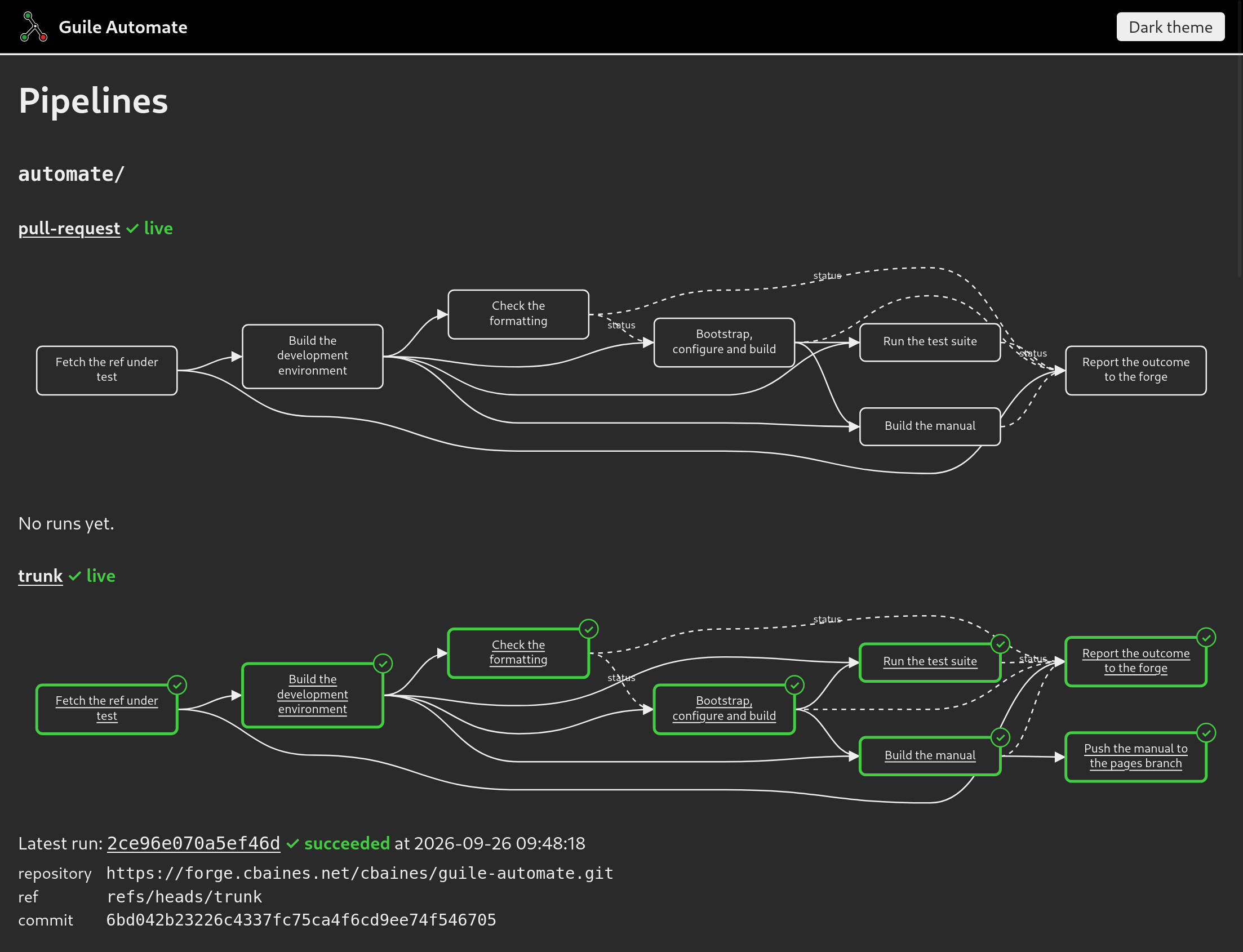
I've put this together over the past two weeks. Similar to Safsaf I worked on this while travelling. I think there's something about this where I feel less pressure to continue grinding away on existing projects and look at something new.
This has also been written using Claude Code, which has some interesting consequences for the software design/architecture process. I'm comfortable designing around Guile, Guix and Fibers, but Spritely Goblins is an unknown. Having something working almost immediately has meant that iterating on how to set out the pipelines has been much easier.
What next?
This is very much a prototype at the moment, but I'd like Guile Automate to become a great generic tool for building and running pipelines. My use cases are around continuous integration and continuous deployment type tasks, but I'd love to hear other tasks where this might be helpful.
Getting the pipeline structure and functionality right is really important. I've already made a bunch of tweaks, but I've been testing this by building pipelines so it's quite possible there's still more to do to perfect the structure. If you do try using it, I'd love to hear how that works out.
Then there's the code quality. I don't subscribe to this notion of not looking at LLM generated code. I've already done a lot of refactoring about how the code is structured and how specific bits work, but there's a lot more to do. The steps do provide isolation, but this needs reviewing to understand the security properties. The Goblins code is also new to me, so I'm excited about figuring out how that fits and what needs fixing or improving.
You can find the source on forge.cbaines.net, logging in to raise issues and pull requests requires a Codeberg account but please contact me if that's an issue. Please also contact me with any thoughts, comments or questions you have.
On the internet, anyone can make a request to your web service. Especially in this time of abusive web crawling linked to AI/LLM companies, it's essential to program in a defensive style and stay in control, even when faced with a volume of requests that can't be handled.
If you don't prepare, requests might start backing up, the impact might spread to services your service uses, the process itself might hit resource limits like the number of open files, and eventually your service might stop responding to requests altogether, even if the storm of requests passes.
What Guile Knots provides
Guile Knots is a library providing some tools and patterns for programming with Guile Fibers (see announcing guile knots for an introduction). The Guile Knots resource pool implementation comes from facing the challenges of running real Guile web services.
The #:default-checkout-timeout and
#:default-max-waiters options on the
resource pool allow setting limits on fetching resources, and failing
when they're exceeded. This is important as you don't want your web
service continuing to process a request long after the client and/or
reverse proxy has given up. Getting an exception from the resource
pool allows you to return a 429 (Too Many Requests) or 503 (Service
Unavailable) response.
Guile Knots includes a fixed size resource pool
(make-fixed-size-resource-pool),
but also a variable size resource pool
(make-resource-pool). For the variable
size resource pool, you can also tune the
#:add-resources-parallelism to set the
number of resources that can be created in parallel.
Example 1: PostgreSQL connections in the Guix Data Service
The Guix Data Service uses PostgreSQL for its database.
Since PostgreSQL has limits on the number of connections, if the data service opened a connection to PostgreSQL when needed, it would be easy for that limit to be hit and errors to occur. When all the PostgreSQL connections are used up, this could then impact other database activity, spreading the damage further.
By using a resource pool for PostgreSQL connections, when there are too many requests to handle, an exception is raised and a 503 (Service Unavailable) response can be returned promptly.
This is what the resource pool in the Guix Data Service looks like in the code:
(let ((connection-pool
       (make-resource-pool
        (lambda ()
          (open-postgresql-connection
           "web"
           postgresql-statement-timeout))
        (floor (/ postgresql-connections 2))
        #:name "web"
        #:idle-seconds 30
        #:destructor
        (lambda (conn)
          (close-postgresql-connection conn "web"))
        #:add-resources-parallelism
        (floor (/ postgresql-connections 2))
        #:default-max-waiters (floor (/ postgresql-connections 2))
        #:default-checkout-timeout (/ postgresql-statement-timeout
                                      1000))))
   ...)
Checking out a connection for a query looks like:
(with-resource-from-pool connection-pool conn
  (exec-query conn "SELECT ..."))
Resource pools have an additional benefit of allowing connections to be reused for multiple requests, avoiding the overhead of establishing new connections each time.
Priority lanes: the reserved pool
You can even go further, the Guix Data Service actually uses multiple
resource pools for PostgreSQL connections, a web pool for most
queries, a web-reserved pool for more important requests and a
background pool for queries not related to requests.
A little history
The Guile Knots resource pool implementation started life in the Guix Data Service. Before Guile Squee supported suspendable ports, the Guix Data Service was using its own thread pool implementation to manage connections. The thread pool was added all the way back in 2020, and the resource pool in 2023.
Example 2: BFFE using the Guix Build Coordinator
The Build Farm Front-end (BFFE) doesn't rely on a database in the same way, but makes requests to a Guix Build Coordinator instance to fetch data for responding to requests.
Guile Knots includes a connection cache, which wraps the resource pool to help use it for connections to network services.
Just like the Guix Data Service, the connection cache means that the number of concurrent connections the BFFE makes to the Guix Build Coordinator is controlled.
Before introducing this, the number of connections and file descriptors in use by the process grew uncontrollably, eventually leading to the web server becoming unresponsive.
The cache is configured at start-up:
;; bffe/server.scm
(define event-source-connection-cache
  (make-connection-cache
   (string->uri event-source)
   32
   #:connect-timeout 5
   #:default-checkout-timeout 5
   #:default-max-waiters 32))
Each request to the build coordinator then uses a cached socket:
(call-with-cached-connection
 event-source-connection-cache
 (lambda (port)
   (http-get uri
             #:port port
             #:keep-alive? #t)))
Patterns worth following
In summary, identify the resources your web service can run out of, and manage these with a resource pool.
This isn't advice specific to Guile Knots, but the resource pool and connection cache that Guile Knots provides should do this well, and you might get some performance benefits too.
Background
Over the past week or two I've been working on a new web framework for Guile. This is based on the knowledge I've accumulated over the past 7 years working on things like the Guix Data Service, Guix Build Coordinator and Nar Herder, but also based on their code, as I've used Claude Code running Claude Opus 4.6 to build this (a large language model).
I've been hesitant to try coding with LLMs so far, I still think there's plenty of reasons to be, and others have done much more thinking about LLMs and the ethical and legal implications of using them to write software.
This blog post definitely isn't an argument for using these tools, but my "excuse" if you call it that, is that I wanted a Guile web framework to both use for existing and new projects, and this was an approach to get there faster and with the limited amount of motivation I have at the moment.
Introducing Safsaf

Safsaf, or Guile Safsaf if you prefer, is a web framework for Guile, built around using Guile Fibers and the Guile Knots web server.
It's only ~1800 lines of code, and the largest part is the router,
deciding which handler should respond to requests. The Guix Data
Service handled routing using match on the method and path
components, and this works pretty well, but for a long while I've
wanted a more declarative approach to routing. One where the code
could introspect the routes and generate links or even API
specifications.
Another important property of having routes as data is that it allows applying handler wrappers to the routes and the handlers that they reference. This is the model that Safsaf uses for middleware or functionality that you want to apply across some or all of the web service. Safsaf comes with a number of useful handler wrappers and functionality like logging and exception handling is implemented as handler wrappers.
I think it's also important what's not included. In comparison to GNU Artanis (which I did try using for the Guix Data Service many years ago), there's no inbuilt support for talking to databases, database migrations, a Model View Controller design or file based templates, and for all these things, I don't currently see a good reason to include support for them.
I would like to look at what can be included for internationalization support, as I think that's important. I'd also like to look at what's required for Server Sent Events (SSE) and WebSocket support, particularly as the Build Farm Front-end (BFFE) uses Server Sent Events.
The Safsaf Git repository includes a couple of example apps which you can run, a paste-bin and a blog site.
There's inevitably some issues with the code, and there's probably some issues with the design as well, but my hope is that this is a good starting point.
If you have any comments or questions, please reach out to me via email at mail@cbaines.net, raise an issue on Forgejo, or contact me on the Fediverse.
I've got a new homeserver/NAS (Network Attached Storage), previously I was using some Raspberry Pis, but I've wanted for a while a low power board that has SATA ports for attaching hard drives and one that could run GNU Guix, and the ZimaBoard 2 looked like it might be a good option.

These were the specific bits that I ordered:
- $349.00: ZimaBoard 2
- $29.90: 2-Bay HDD Rack Tray for ZimaBoard 2
- $9.90: PCIe to NVMe & NGFF SSD Adapter
It's definately not a low cost approach, but the x86 architecture, PCIe slot, dual 2.5G networking, SATA ports and passive heatsink case are all really nice features to have.

The PCIe to NVMe & NGFF SSD Adapter does work, but comes with a full size bracket, which doesn't fit the smaller mount on the HDD Rack Tray. It's fine just sitting there though.
Installing Guix was very easy, I connected a display to the mini DisplayPort connector and booted the installer image from a USB drive, installing Guix on to NVMe drive. I think I had to fiddle in the UEFI bios to get the installer to boot, but this didn't take too long.

For playing audio around the house, I'm using MPD+Snapcast with the snapclient's running on various Raspberry Pis. I've got MPD setup, and I've got the Snapcast server running in a screen session currently (this needs Guix service).
I'm running ddclient to do dynamic DNS, and I'm working on packaging this for Guix, it could also do with a system service.
To get the attached hard drive to spin down, I'm using hd-idle. This needs adding to Guix and also could do with a system service.
I'm using this for Wireguard, which is something I'm new to configuring, I think I've got this working now so I can connect in to my home network easily.
I'd like to run Prometheus for monitoring, and I had a go using Jellyfin on onen of the Raspberry Pis, so it would be nice to try that on this machine as well, those take a bit more effort to get running on Guix though. I should also sort using this machine for backups.
If you've got any comments or questions, please reach out on the Fediverse @cbaines@gts.hotaircat.net . I'd love to hear what other people are using Guix homeservers for.
Guile Knots is a library providing higher-level patterns and building blocks for programming with Guile Fibers.
I started developing it back in 2024, extracting code I'd written for the Guix Data Service and Guix Build Coordinator, making it possible to use this code in other services like the Bffe, Nar Herder and QA Frontpage.
I started using Guile Fibers first for the Guix Data Service all the way back in 2019, and that was just because I copied the initial code from the Mumi project.
There have definitely been some problems I've hit along the way, but using Fibers seems like a good fit for the software I've been writing in the past few years, and the functionality in Guile Knots is an essential part of that.
To call out just some of the included functionality, the resource pools are a versatile tool, which can be used for database connections or limiting parallelism to give just a couple of examples.
(let ((connection-pool
       (make-resource-pool
        (lambda ()
          (open-postgresql-connection
           "web"
           postgresql-statement-timeout))
        (floor (/ postgresql-connections 2))
        #:name "web"
        #:idle-seconds 30
        #:destructor
        (lambda (conn)
          (close-postgresql-connection conn "web"))
        #:add-resources-parallelism
        (floor (/ postgresql-connections 2))
        #:default-max-waiters (floor (/ postgresql-connections 2))
        #:default-checkout-timeout (/ postgresql-statement-timeout
                                      1000))))
The thread pools are useful when threads are required, useful for interacting with SQLite for example.
(let ((reader-thread-pool
       (make-fixed-size-thread-pool
        (min (max (current-processor-count)
                  32)
             128)
        #:thread-initializer
        (lambda ()
          (let ((db
                 (db-open database-file #:write? #f)))
            (sqlite-exec db "PRAGMA busy_timeout = 5000;")
            (list db)))
        #:thread-destructor
        (lambda (db)
          (sqlite-close db))
        #:thread-lifetime 50000
        #:name "db read")))
Using suspendable ports you can do reliable I/O, and Guile Knots
includes with-port-timeouts which supports timeouts both for plain
suspendable ports and for fibers.
(with-port-timeouts
 (lambda ()
   (http-get ...))
 #:timeout 20)
The parallelism procedures and promises make it easier and safer to
take advantage of the parallelism that fibers open up, and the
exception and backtrace handling through
print-backtrace-and-exception/knots helps to address the issues that
this causes for debugging.
(fibers-let
    ((package-derivations
      (with-resource-from-pool (connection-pool) conn
        (package-derivations-for-branch conn
                                        (string->number repository-id)
                                        branch-name
                                        system
                                        target
                                        package-name)))
     (build-server-urls
      (call-with-resource-from-pool (connection-pool)
       select-build-server-urls-by-id)))
Then there's the web server. One key motivation for this was to have a web server implementation which didn't read the request body into memory. Not doing this makes it possible to write a web server that receives requests with large amounts of data (e.g. file uploads), which was a key requirement in the Guix Build Coordinator. The knots web server expects to be started from fibers, rather than calling run-fibers itself, which makes it possible to run multiple servers on different ports as well as doing initial setup in fibers before starting the server.
I've also worked on support for chunked transfer encoding for both request and response bodies, encoding handling improvements, buffering improvements and reliability improvements.
Thanks to the great Guile Documenta, there's documentation available online for Guile Knots.
If you have any comments or questions, please reach out to me via email at mail@cbaines.net, raise an issue on Forgejo, or contact me on the Fediverse.

I travelled to Paris over the last week for the Reproducible Builds workshop there, as well as a GNU Guix meetup on the day before. All in all, it's been awesome, if a little tiring.
It was reassuring to spend some time with others who care enough about free software and related things to take a number of days out to come together and work on reproducible builds and related topics.


Monday, Guix meeting at Inria

I'm very thankful to Ludovic and Inria to organising and hosting the event.
I've been looking at code review and automated testing in the last few weeks, and I think the discussions around that did move things forward.
The issue of substitute delivery for GNU Guix was also discussed a few times, and at the Reproducible Builds summit, the presence of some people who were very knowledgeable about IPFS (the Inter Planetary File System) at the summit were very helpful.
Tuesday, Start of the Reproducible Builds workshop
The morning was filled with some knowledge sharing sessions, which was great for me, as this was my first reproducible builds summit.
I know now a little more about the Reproducible Builds organisations infrastructure, and I discussed the technical side of getting data regarding the reproducible of Guix packages in to the Reproducible Builds database.
The agenda and notes for the event are available here.


Wednesday
In the morning, I talked to others in the cross distribution session on Guix things, issues with upstreams and various other topics.
I was already thinking about a patch I made to Ruby, and used in govuk-guix to make downloading Rubygems more reproducible, however I was hesitant to push it upstream as I wasn't sure it was more generally useful. I ended up talking about this in the skill share session, and found someone else who was interested in Ruby reproducible builds. I've now pushed that patch up for review.


Thursday
I went along to a session on rebuilders, mostly to try and figure out
the relevance to Guix. I have a better understanding of this
now. Guix, and some other projects (Nix, maybe F-Droid, ...) already
have some of the pieces of this just due to how they normally
work. For Guix, the technical side of a "rebuilder" is just a standard
"build farm", ci.guix.info, or hydra.gnu.org for example.
The client verification with rebuilders is also mostly in place already for Guix. Whereas in Debian, you need to use the buildinfo files to check with rebuilders about the results they got, the narinfo files Guix uses when trying to find substitutes already fulfil this purpose, just because of how Guix works.
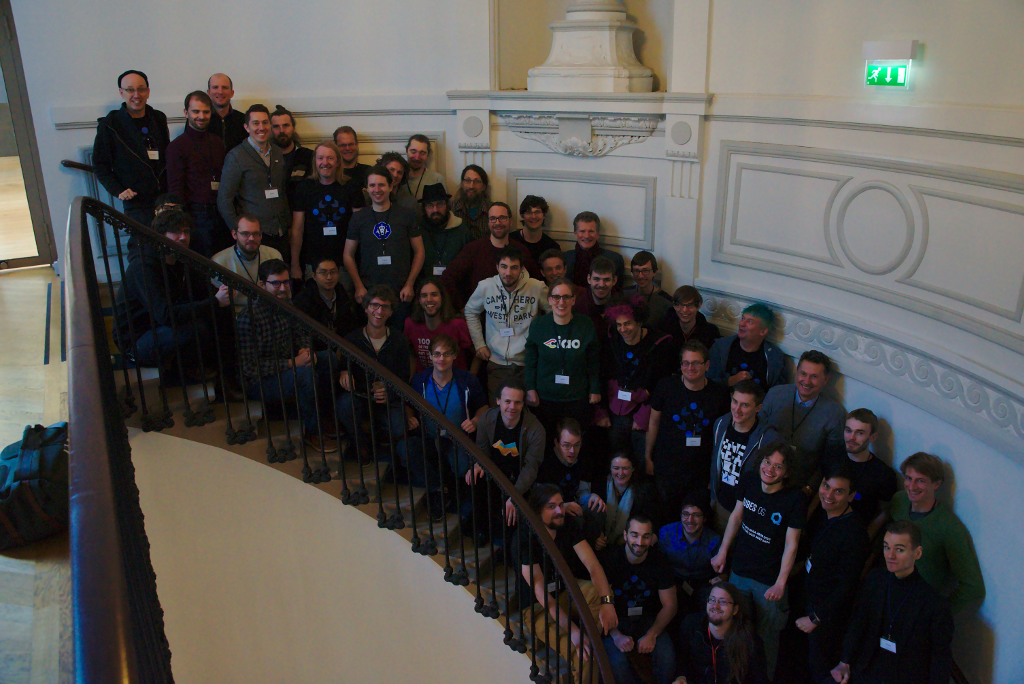
I'm looking forward to all of the things that these events have boosted. The next month or two is going to be very interesting, with things like FOSDEM coming up at the start of February, and Guix maybe releasing a 1.0 around then.

Freenode #live happened again, and like last year, it was in Bristol over the weekend.
Unlike last year, I'm not doing a talk, but this year I did head out to Bristol on the Thursday to allow some time before the conference begun on Saturday to do some exploring.
On the Thursday
Walking up to the Clifton Suspension Bridge was great. I crossed to the west of the river, walked up to the bridge and then over.
 |
 |
 |
 |

On the way back, I visited the Calbot Tower. The light was fading by this point, which was great to see looking down on Bristol.


On the Friday
I set off to visit two places. First the SS Great Britain, then the Bristol Museum & Art Gallery.
The SS Great Britain was well worth a visit. I'd somehow managed to miss this when walking along the opposite short of the river only the day before.


I visited the Calbot tower again, this time in the light.
Still the same amazing view, just now I could see a bit more in the daylight.


I was impressed by the amount of stuff in the museum.
It just kept going on and on. The range was impressive as well, like a mini British Museum. It had exhibits on sea life along the coast, ancient Egypt and Assyria, maps of Bristol, dinosaurs, minerals, glassware and a whole range of other art.

On the Saturday
Saturday was the actual first day of the conference. Chris Lamb's talk| was a nice way to start.
The schedule is available online, and talk videos are available on YouTube it's well worth talking a look at what videos are available. I've directly linked to those I comment on below.
Doc Searls and Simon Phipps - In Conversation
I didn't know anything about either speakers prior to the conference, and I still don't know that much, but they both had really interesting things to say and interesting perspectives.
Doc Searls opened with some great comments on privacy, this then led on to discussion of the GDPR.
"The because effect" (10:08) was interesting with respect to the money aspect of free software.
Some very insightful comments were made with respect to cloud computing. Copyleft came up (16:57).
Something which resonated with me quite a bit was the reiteration of the "open source is simply a marketing term for free software" (23:13).
John Sullivan - How can free communication tools win?
Communication tools are a important intersection where both software freedom and interoperability/federation really matter, and this talk was great at presenting the problems faced.
Bradley Kuhn - Interactive chat and the future of software freedom
I think this was my favourite talk of the conference, it's really worth a watch.
On the Sunday
GNU Emacs for all
An excellent talk, reminded me that while I've come a long way with Emacs, there's still a lot more to take advantage of.
Kyle Rankin - The death and resurrection of Linux Journal
A trip back through time, in the context of the Linux Journal.
Neil McGovern - Software desktops to 2025 and beyond!
A look at desktops, with some interesting perspectives from Neil, the current executive director of the GNOME Foundation.
VM Brasseur - Four ways to spread the four freedoms
I really liked the start of this talk, beginning with the 4 freedoms. However, some of the points made later felt particularly polarising.
Particularly at one point with regard to operating systems, the speaker makes the point that free software should be provided and supported on Microsoft Windows, but there isn't any suggestion of how to practically do this.
My guess is that there's a lot of dependency issues with even getting some software to work on Windows, let alone attempting to provide support for something that the contributors might not even have used.
Finally...
All in all, it was a great conference. I'm very grateful to all the organisers and speakers.
The single track this year meant I actually saw most of the talks. I didn't speak, but I did enjoy the time that gave me to explore Bristol a bit, and actually enjoy the conference a bit more.
Hopefully there will be another Freenode #live next year!

I ordered a Librem 13, all the way back at the end of June (2017), and it was shipped at the end of October.
Prior to getting my Librem 13, I've been using a Lenovo T431s which is a great little laptop. The hardware worked ok with Debian, although the Intel Wi-Fi card required some non-free software (iwlwifi), and I never tried the fingerprint reader. The hardware is also a little limiting, as there isn't any support for M.2 SSDs, and it can only support 12GB of RAM.
The Librem 13 however supports up to 16GB of RAM, as well as a M.2 SSD. Rather than using Debian, I've been transitioning to use GNU Guix for a couple of years now, so this is what I installed on my new Librem 13, hence the stickers I added!
I brought the laptop with a M.2 SSD in it, but then put a SATA SSD in as well. This required a bit of fiddling as one of the internal cables was in the space for the SSD, so I had to move it a bit.

I was planning to put the Guix store on the bigger SATA SSD, while keeping the root partition on the M.2 SSD, with both disks using Btrfs on top of dm-crypt.
Unfortunately I had some issues setting this up. The partitioning scheme I had in mind isn't quite supported by GuixSD yet, as if I remember correctly, the Grub configuration generated is incorrect. For now, I just have the store on the M.2 SSD.

As for using it, the main issue I've had is the webcam initially not working, which is a bit of a non-issue, as I don't have much use for the webcam. I've been in contact with Purism support, and I could return it for a replacement, but at the moment I'm fine with the one I've got. However, today the webcam sprang in to life for a few minutes, which is pretty exciting.
The other minor gripe I have is not being able to tell if it's off or suspended without opening it up. The T431s has a little red LED on the top, which will pulsate if it's suspended, which is reassuring that it's actually suspended when you close the lid.
As for the rest of the hardware, it's pretty awesome. The case feels very tough and sturdy, and the keyboard and trackpad work well. All in all, I think it's a great bit of hardware, and I really like Purism's emphasis on user freedoms through free software.

I've been using Bytemark for a while now, both personally and professionally, and one thing that has got me excited recently is running GuixSD on Bytemark VMs.
A while back, I installed GuixSD on a Bytemark VM first by creating a VM on Bytemark using Debian as the operating system, then installing Guix within Debian, then using that installation of Guix to install GuixSD over the top of Debian.

This "over the top" approach works surprisingly well, you just have to remove a few key files from Debian before rebooting, to ensure GuixSD is able to boot. It does have several disadvantages though, its quite slow to install GuixSD this way, and you have to manually clean out the Debian related files.
Bytemark do support inserting ISO images in to the VMs, which can be used to install operating systems. Up until recently, Guix didn't have an ISO installer, but now, with the 0.14.0 release, there is one available.
In case you're interested, here is a quick description of what this involves. You might want to follow along with the full system installation documentation at the same time.
Step 1: Create a new cloud server
I selected mostly the defaults: 1 core, 1 GiB of RAM, 25 GiB of SSD storage. For installing GuixSD, select None for the operating system.
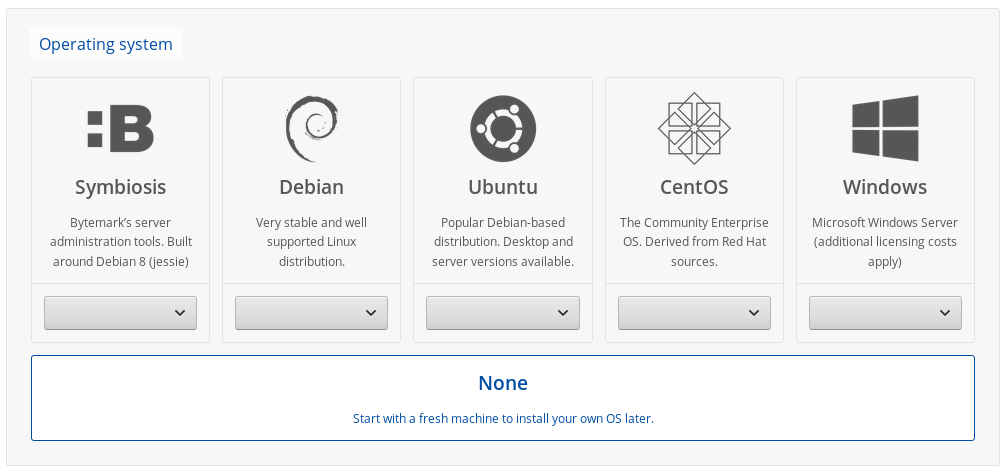
Step 2: Insert the GuixSD installer ISO
Open up the server details, and click the yellow "Insert CD" button on the left.
Pop in a URL for the installation image. It needs to be decompressed, unlike the image you can download from the Guix website.
To make this easier, I've provided a link to a decompressed image below. Obviously using this involves trusting me, so you might want to decompress the image yourself and upload it somewhere.
https://www.cbaines.net/posts/bytemark_server_with_guixsd/guixsd-install-0.14.0.x86_64-linux.iso
Step 3: Boot in to the installer
After that is done, click the VNC button for the server to the top right, and once the window for that opens up, click the red "Ctrl + Alt + Delete" button to trigger the system to restart. This should get it to boot in to the installation image.
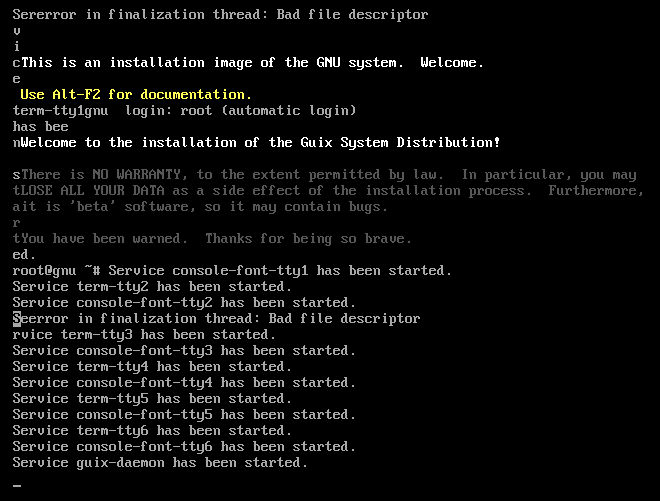
Step 4: Setup networking
Run the following commands to bring up the network interface, and get an IP address.
ifconfig eth0 up
dhclient eth0
Step 5: (Optional) Start the SSH daemon
If you're happy using the web based console, the you can continue doing that. However, the installer includes a ssh-daemon service which can be used to continue the installation process over SSH.
If you want to use this, use the passwd command to set a password for the root user, and then start the ssh-daemon service.
passwd
herd start ssh-daemon
After doing this, you can find out the IP address, either from the Bytemark panel, or by running:
ip addr
Once you have the IP address, login to the machine through SSH and continue with the installation process.
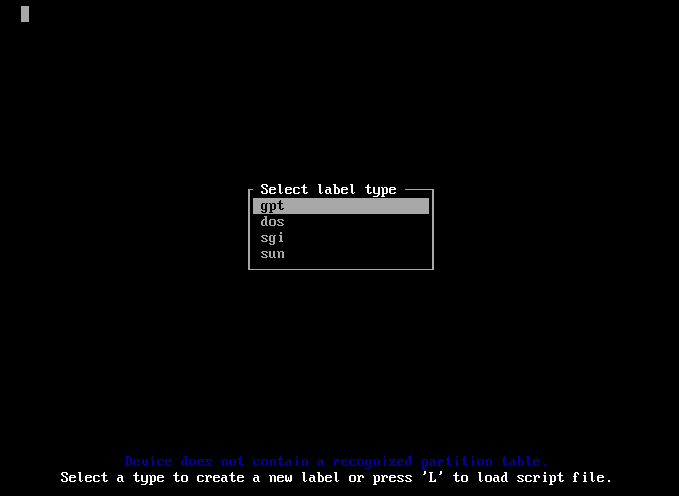
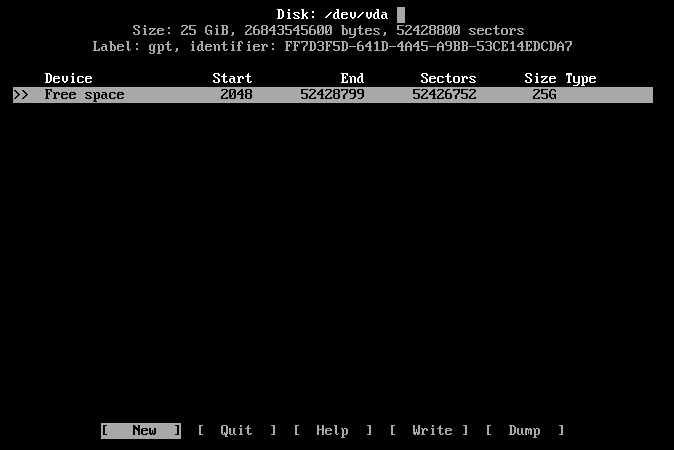
Step 6: Partition the disk
Select the default partitioning type, gpt.
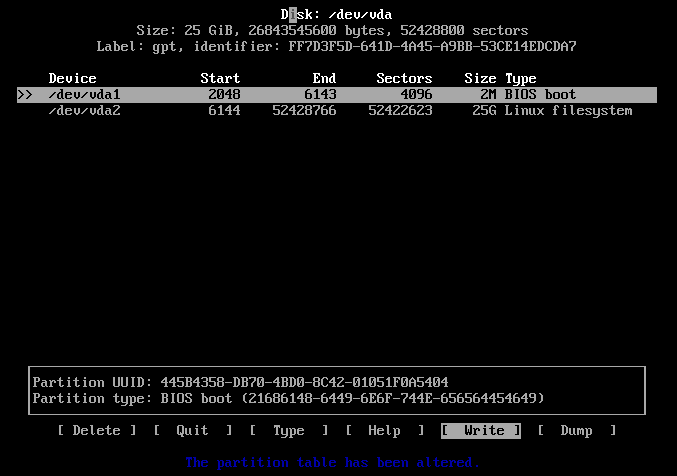
Create a "2M" BIOS Boot partition, and then a 25GB Linux filesystem.
After that select the "[ Write ]" option, and then the "[ Quit ]" option.
Step 7: Create and mount the root filesystem
mkfs.ext4 -L root /dev/vda1
mount LABEL=root /mnt
Step 8: Write the configuration
mkdir /mnt/etc
cp /etc/configuration/bare-bones.scm /mnt/etc/config.scm
I then edited this file with nano, mostly as using zile with C-n for move down kept opening new browser windows.
- Changed the hostname and timezone
- Set the bootloader target to "/dev/vda"
- Changed the filesystem device to root
- Set the name of the user
- Change the home directory
Step 9: Start the cow-store service
herd start cow-store /mnt
Step 10: Run guix system init
I did have some problems at this point, as the VM appeared to reboot. I tried again, but this time with the --no-grafts option, and it worked. If you encounter something similar, try adding the --no-grafts option to guix system init, and I'd also be interested to know.
guix system init /mnt/etc/config.scm /mnt
...
Installation finished. No error reported.
If this works succesfully, you should see the above message at the end.
Finish: Reboot in to GuixSD
Reboot, and then remove the CD from the system using the Bytemark panel.
reboot
If you run in to any trouble, there is a IRC channel (#guix on Freenode) and a mailing list where you can ask for help.
Also, while this guide may go out of date, if you do have any suggestions or corrections, you can email me about them.
The first Freenode #live conference happened on the weekend just passed (28th and 29th of October), and it was awesome but exhausting.
I met up with many people, some who I'd met at previous events like the recent GNU Hackers Meeting and others who I'd not met before.
The speaker events, both the cheese and open bar in a pub on the Friday, and the formal dinner on the Saturday were very enjoyable with lots of interesting conversation.
I gave a talk on Guix, (view the slides). As always, while I submitted the proposal a while in advance, I was editing the notes right up until Sunday morning.
The freenode staff did an awesome job organising the event, and what they pulled off was incredible given the ticket costs. I'm guessing this was due to the generous sponsorship.
All in all, I'm hoping to attend next year!